
Dragonfish is a culture and performance consultancy that helps organisations unlock their potential through data-driven insights and behavioural change. Together, we designed a web-based performance tracker that allows clients to send pulse surveys, analyse results, and understand how their company culture impacts performance.
My primary responsibilities were verifying the market need for the product and collaborating with the team to design the end-to-end UX/UI experience.
Company
JB/UXD
Role
UX/UI Designer
Timeline
4 months
Responsibilities
Research
Facilitation
UX/UI design
Visual Design
Prototyping
For over a decade, Dragonfish has been an award-winning global consultancy helping organisations understand and improve company culture to drive sustainable growth. However, their existing process for sending pulse surveys and compiling reports through tools like SurveyMonkey was manual, time-consuming, and difficult to scale.
This created an opportunity to design and build a web app that would automate survey distribution, simplify reporting, and help clients measure and track cultural performance more effectively.
We had two main goals for this project.
We had two main goals for this project. First, to use a Design Sprint to scope the first major release of the web app, focusing on features customers valued most.
Second, to design and prototype the end-to-end journey for the first Minimum Viable Product (MVP), one that could validate the concept and attract investment for full-scale development.


Verifying an idea through a Design Sprint
Over four weeks, we ran two design sprints. The first focused on aligning the vision and testing the product’s viability, while the second refined the concept based on user feedback and created a product report to help Dragonfish secure funding.
After confirming market interest, Dragonfish successfully raised capital to build the MVP web app. A few months later, we reunited to flesh out the complete customer journey for development.

Workshop
We began with an alignment workshop to bring all stakeholders together and clarify the problems we wanted to solve. By mapping the current customer journey, we identified major inefficiencies in Dragonfish’s manual process of sending surveys and compiling data across multiple tools. The process was essential for their business but also a major bottleneck. During this stage, I supported the Lead Designer in co-facilitating discussions and capturing insights that would inform our sprint direction.
Workshop
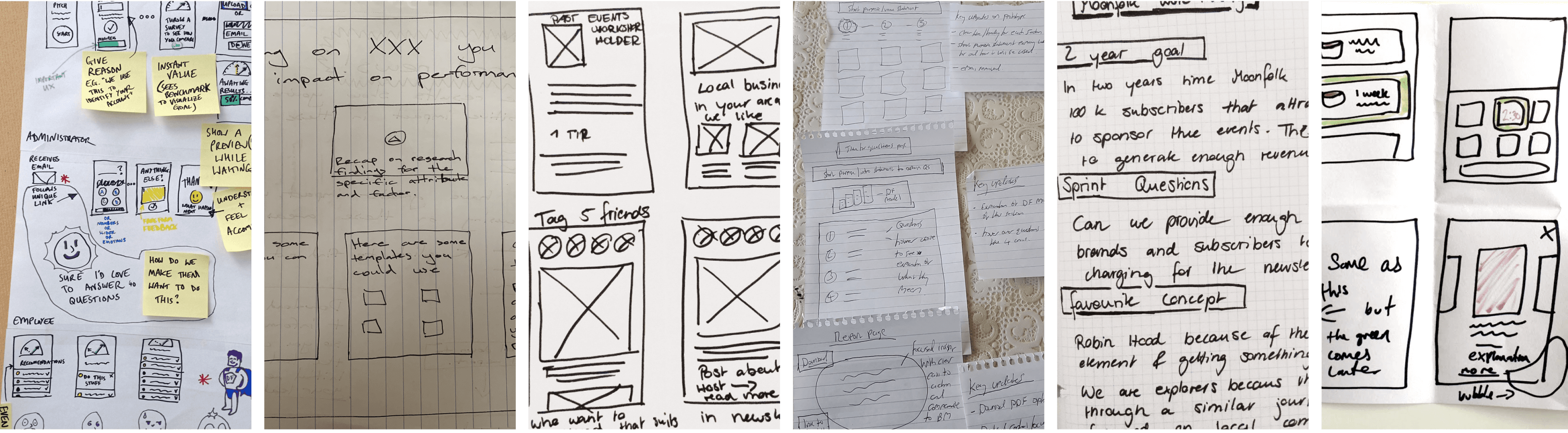
Once aligned, we moved into a solution-focused workshop using methods like Lightning Demos, note-taking, sketching, and Crazy 8’s. These exercises encouraged creative thinking from everyone in the room. After voting on the strongest ideas, we merged them into a unified storyboard outlining the first version of our user journey.
Through this process, we realised that the opportunity extended beyond improving one step, we could create a product that transformed multiple aspects of Dragonfish’s workflow. Our proposed solution would allow clients to send pulse surveys without Dragonfish’s manual involvement, automatically generate downloadable reports benchmarked against industry data, and provide personalised recommendations to help companies improve their scores over time across categories such as performance, customer alignment, brand alignment, emotional commitment, and job satisfaction.


We decided to focus on designing a free version of the app for early testing. The goal was to attract users to try the experience, set goals, and view their culture score before registering. I created wireframes for this initial journey, including the benchmarking dashboard where customers could view their results and recommendations for improvement.
Once the wireframes were validated, I produced high-fidelity prototypes so that participants in our interviews could experience the product as if it were live.
We tested our prototype with 11 participants in senior HR and change management roles across a range of large organisations. The sessions provided valuable insights into how potential customers perceived the tool and where improvements were needed.

Users were uncertain about the credibility of some of the survey questions.
Many participants questioned the credibility of the survey questions, suggesting that each section needed more carefully chosen questions to give an accurate diagnosis of job satisfaction.

Users found value in the performance checklist but felt it was overwhelming.

On the pricing pages, users wanted to explore individual features in more depth.


After iterating on the designs based on testing insights, I helped prepare the final prototype, design documentation, and presentation for Dragonfish’s investor pitch. The improved prototype played a key role in securing the next round of funding.
A few months later, we resumed work to design the full end-to-end journey for development. My focus was on defining task flows and building the design system to ensure visual and functional consistency across the product.

Workshop
With the design system in place, I revisited our earlier designs to refine and expand the customer experience. I integrated insights from testing to ensure that every screen addressed a validated need, focusing particularly on simplifying workflows and maintaining clarity in the data visualisation screens.

Once the final designs were complete, we created a story map to prioritise MVP features and determine which elements could be released later. This structure helped Dragonfish and the development team stay focused on delivering the highest-impact functionality first.
To support development, we used Propeller, a front-end framework based on Material Design, to accelerate implementation. I prepared a comprehensive handover document outlining components, assets, and style specifications to ensure a smooth build process.

To attract new customers, we designed a free quick survey that lets them set goals, answer culture-related questions, and instantly view their benchmark results, all before registering. This allowed customers to experience the product’s value immediately and encouraged them to sign up for deeper insights.
After completing the survey, customers see a benchmark dashboard showing their overall score, key improvement areas, and tailored recommendations. From here, they’re prompted to register to continue tracking progress and unlock advanced features.


Once registered, customers can customise pulse surveys by choosing question sets, adding their own questions, and enabling advanced reporting. This flexibility helps HR teams and leaders generate more meaningful insights and compare results across departments or categories.
The employee survey flow was designed to be simple and engaging. Employees receive clear, concise questions that encourage honest feedback, creating a smooth and approachable experience that supports more authentic responses.

Asynchronous work setting
This was the first fully remote project I worked on during the pandemic. Running workshops, interviews, and reviews entirely online taught me the importance of structure, clear communication, and using the right tools to keep cross-functional teams aligned in a distributed environment.
Choosing what we won't do
I learned the value of defining a true MVP, focusing on the features that drive the most impact and removing anything that could distract from core outcomes. This approach helped us design with purpose and deliver results faster.
Don't create problems from the get-go
One of my biggest takeaways was learning to think about design from a developer’s perspective. By considering technical feasibility early, I was able to reduce friction later in the process and prevent potential implementation challenges.